Work can't hide
Every box must declare a next action, a responsible party, or a reason it is blocked. Nothing stays ambiguous. Nothing silently disappears.
BoxOS forces every task to declare its state. Overdue work escalates automatically. Weekly reviews surface problems before they compound. Built for professionals who refuse to let things slip.
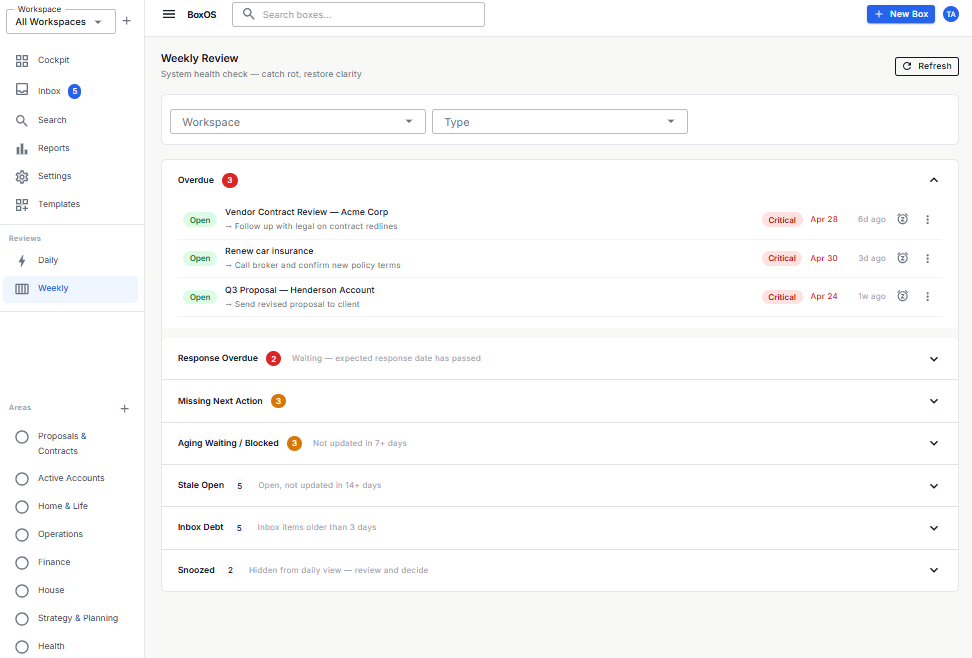
Most tools let tasks rot quietly in a list. BoxOS does not. Every box has to say what state it is in, and reviews bring broken work to the top.
Every box must declare a next action, a responsible party, or a reason it is blocked. Nothing stays ambiguous. Nothing silently disappears.
When a box is past its due date, urgency escalates to Critical everywhere it appears - cockpit, reviews, filters. You can override it, but you can't ignore it.
Daily and Weekly Reviews surface problems first - overdue, missing next actions, stale waiting items - not just a flat list of everything. You see what needs attention before it becomes a crisis.
Snooze hides a box from daily views but it always resurfaces in Weekly Review. You can delay, not disappear.
The app is strict on purpose. That is why work stays visible instead of drifting for weeks.
Drop anything into Inbox. No friction, no required fields yet.
Process Inbox items by declaring a workspace, type, and next action. You can't mark something Open without one. The app enforces it.
Daily Review shows what is overdue, unclear, or ready to act on - in that order. Weekly Review catches everything else: stale items, waiting overdue, inbox debt.
Start free. Upgrade when your workload and storage needs grow.
Enough to run a real system - not a crippled demo.
For when your workload outgrows 30 boxes and 300 MB.
When work needs to move across people without losing structure.
Yes. The Free plan includes 3 workspaces, 30 boxes, 300 MB of storage, and web plus mobile access.
Pro removes workspace and box limits, increases storage to 10 GB, and supports files up to 500 MB.
Team includes everything in Pro, increases storage to 100 GB, and adds box sharing for shared workflows.
Yes. You can define custom box types, apply templates, and keep repeatable work structured from the moment it starts.
Yes. BoxOS is available on web and mobile so your workspace is accessible wherever work happens.
Your application data is authenticated on every request and stored on Azure infrastructure with encryption in transit and at rest.
Set up your first workspace for free and upgrade only when the scale, storage, or sharing value is clear.
Create Your Workspace